2.3 Users, Login and Permissions
Users and groups are part of standard Tryton. This page only gives an overview of what matters for real estate management; the other tabs are described in the Tryton documentation.
Every person working with the system is created twice:
- as a user under Verwaltung › Benutzer › Benutzer (Administration › Users › Users) – for login and access rights;
- as a party (business partner) and as an employee of the company – for responsibilities, tasks and correspondence, see 3.2 Companies and Employees.
Create a User
The header of the form holds Name, Benutzername (login), Passwort (password, made visible with Anzeigen), Aktiv, E-Mail and a picture. Below follow the tabs Benutzer (user), Aktionen (actions), Zugriffsberechtigungen (access permissions), Anwendungen (applications), Einstellungen (preferences) and Dashboard.
Tab User: Companies and Employees
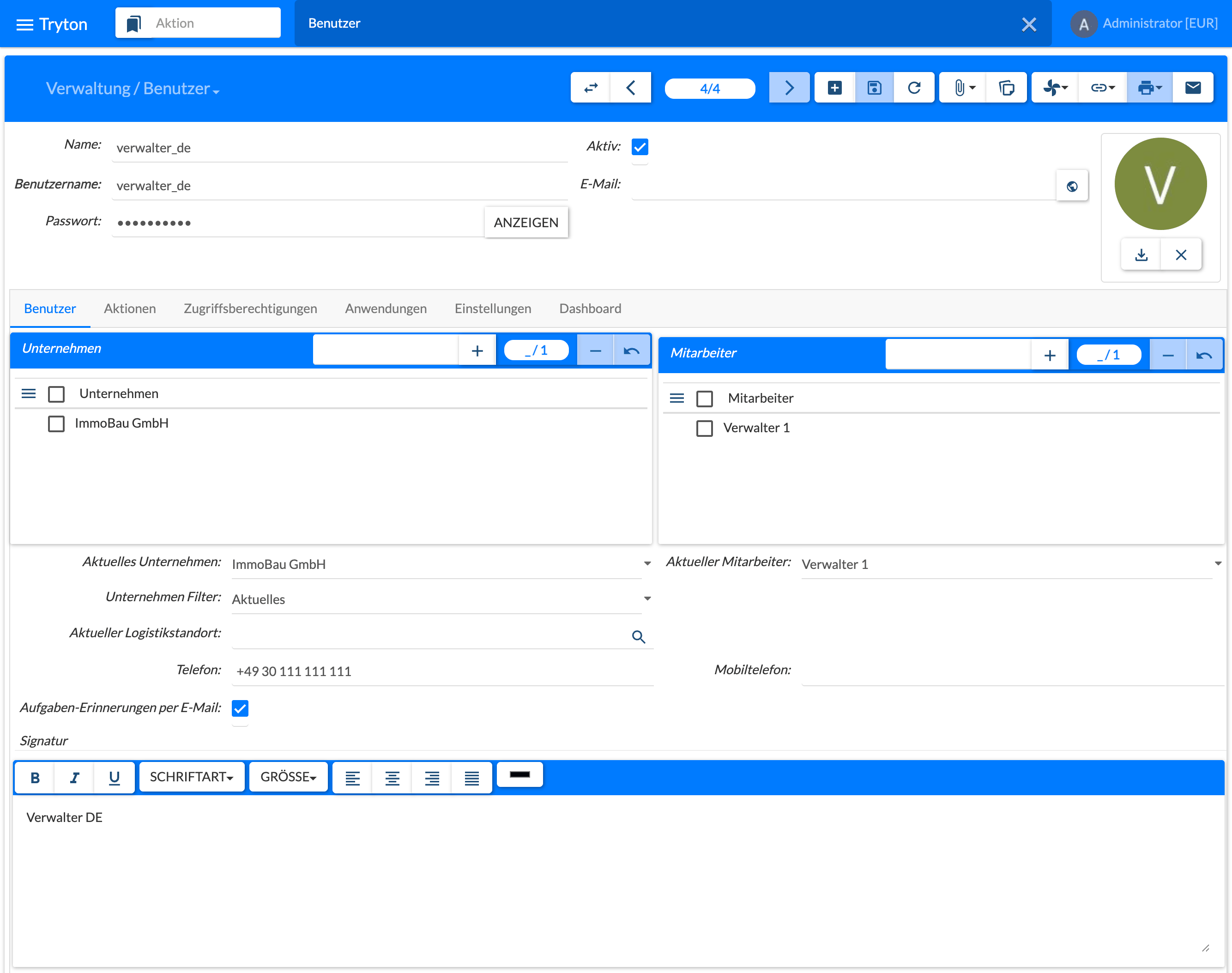
In the tab Benutzer (user) the system user is linked with their Mitarbeiter (employee), i.e. the party (business partner) from 3.2 Companies and Employees. Only then can the employee be used in processes and tasks, and the user receives and handles their tasks, see 10 Tasks and Processes.
- Unternehmen (companies): the companies the user may work for.
- Mitarbeiter (employees): the employee parties of the user. This list determines which user is responsible for a task: if an employee holds the responsible party role on the object, the user receives the task, see 5.1 Property – tab Partner. An employee should therefore be assigned to exactly one user.
- Aktuelles Unternehmen and Aktueller Mitarbeiter (current company / employee): what the user is currently working with. The Aktueller Mitarbeiter is set (in the figure Verwalter 1) and entered e.g. as Erledigt von (done by) when a task is completed. Unternehmen Filter (company filter) defines whether only data of the current company is shown.
- Aktueller Logistikstandort (current warehouse): for stock and inventory.
- Telefon and Mobiltelefon (phone, mobile) of the user.
- Aufgaben-Erinnerungen per E-Mail (task reminders by e-mail): in addition to the notification in the client, the user receives e-mail reminders for tasks whose type sends e-mails.
- Signatur (signature): formatted text, e.g. for e-mails.
Groups and Permissions
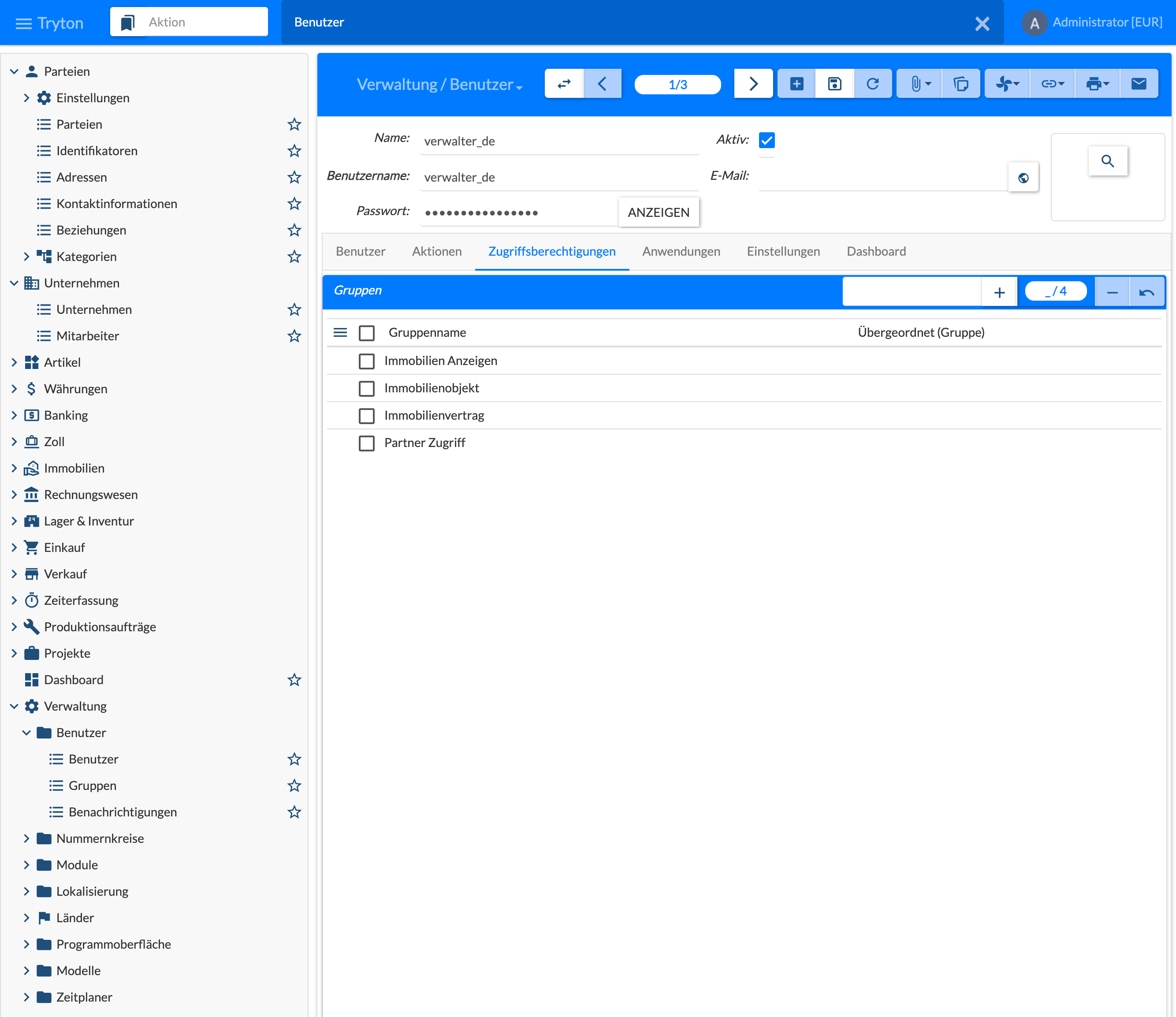
In the tab Zugriffsberechtigungen Gruppen (groups) are assigned to the user; + adds a group, − removes it. The groups control which menus are visible and which data may be read or changed. The module ships these groups:
| Group | Purpose |
|---|---|
| Immobilien Administration (Real Estate Administration) | Maintain settings and master data of the module |
| Immobilienobjekt (Real Estate Object) | Edit real estate objects |
| Immobilienvertrag (Real Estate Contract) | Edit contracts |
| Immobilien Abrechnung (Real Estate Billing) | Carry out the operating cost settlement |
| Immobilien Anzeigen (Real Estate View) | Read everything in the module, change nothing |
| Rechnungswesen Anzeigen (Accounting View) | Read accounting data, change nothing |
| Partner Zugriff (Party Access) | Create, change and delete parties – all other groups see parties read-only |
In the figure the user has the groups Immobilien Anzeigen, Immobilienobjekt, Immobilienvertrag and Partner Zugriff. The groups themselves are under Verwaltung › Benutzer › Gruppen.