6.7.1 Graduated Rent
A graduated rent is agreed and generated once when the contract is concluded. After that nothing needs to be done per step: every step is a contract term of its own, and the periodic posting invoices the new amount automatically from its start.
Prerequisites (once)
- Allow the procedure: Graduated rent must be entered under Zulässige Anpassungsverfahren (Allowed Adjustment Procedures) on the contract type and on the term type of the rent (e.g. 1000 “Apartment rent”). In addition it must be allowed for the type of use of at least one rental object; in the default data this is the case for apartment, office, shop etc. See 2.5.4 Contracts.
- Absolute amount: The term type of the rent must not have a Bemessungstyp (measurement type), otherwise Generieren (Generate) stops with check G15. An Informativer Bemessungstyp (informative measurement type, e.g. living area) is allowed; it is used for the input mode “amount per area” and for the display in €/m².
Create the Contract
- Create the contract as a draft as usual: party, item with rental object, terms. The rent term becomes the reference term (step 0). It starts with the start of the lease; its end usually stays open.
- Optional for residential space: check the initial rent against the rent cap with the wizard Prüfung Vergleichsmiete Neuvermietung (Check Comparative Rent – New Letting).
- Save.
Create and Generate the Steps
The rent adjustment is created in the tab Mietanpassungen of the contract, see 6.7 Rent Adjustments.
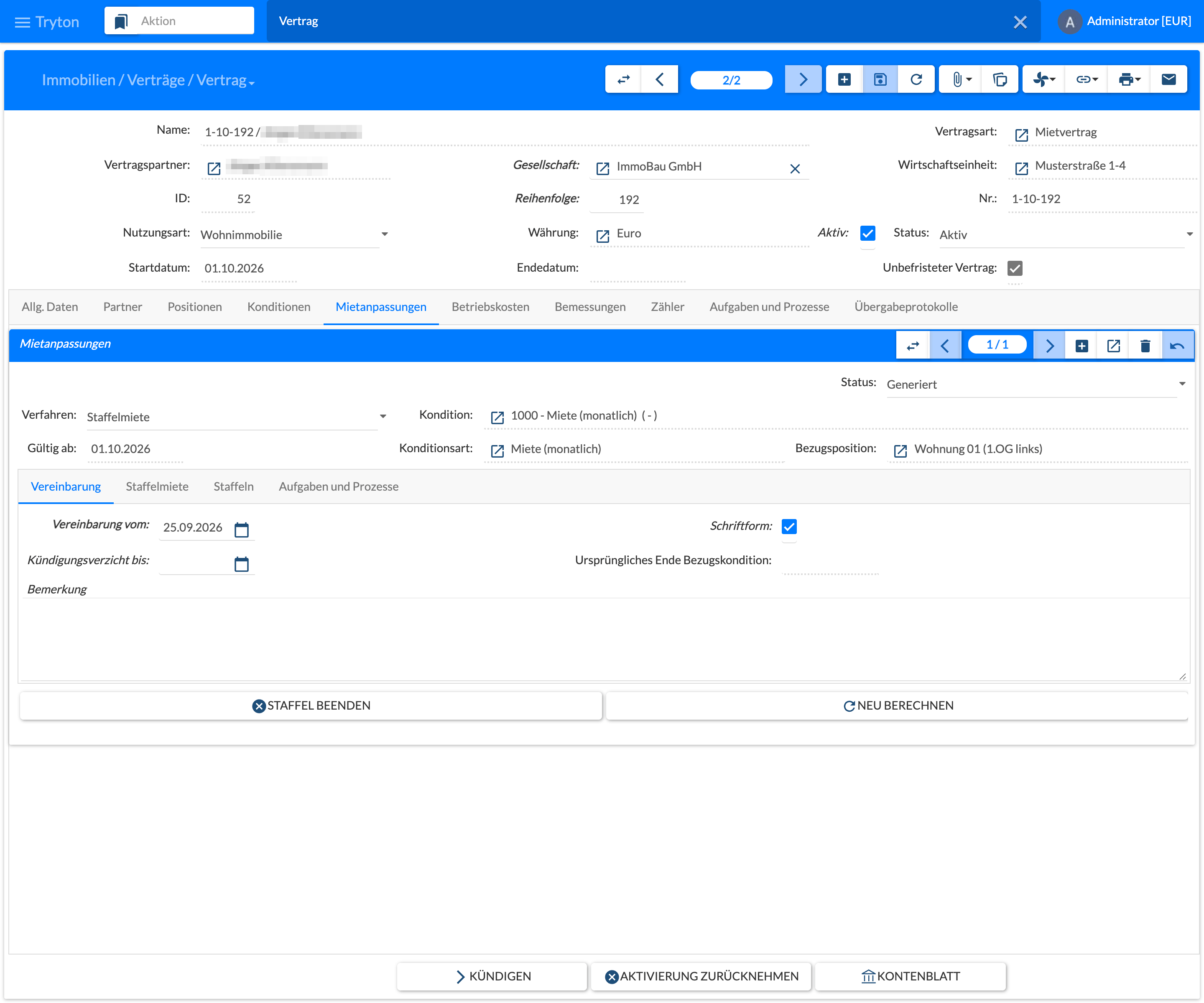
The header of the rent adjustment shows Verfahren (procedure), Kondition (reference term), Gültig ab (valid from), Konditionsart (term type), Bezugsposition (reference item) and the Status (in the figure: Generiert, generated). The tabs Vereinbarung (Agreement), Staffelmiete, Staffeln (Steps) and Aufgaben und Prozesse (Tasks and Processes) structure the data; the field Ursprüngliches Ende Bezugskondition (original end of base term) keeps the end of the reference term before generating – it is restored on reset or taken over by the last step.
- In the tab Mietanpassungen (Rent Adjustments) of the contract click New, choose the procedure Staffelmiete, then the rent term.
- In the tab Vereinbarung (Agreement):
- Vereinbarung vom (agreement date) is required.
- Schriftform (written form) is required for residential space; for commercial space only a warning appears.
- Kündigungsverzicht bis (waiver of termination until) is optional.
- In the tab Staffelmiete:
- Rhythmus (Monate) (interval in months): at least 12.
- Anzahl Staffeln (number of steps).
- Eingabeart Erhöhung (input mode of the increase):
- Absoluter Betrag (absolute amount): € per period;
- Betrag je Fläche (amount per area): € per m²; the area is fixed when generating;
- Prozent (percent), with Bezug %-Erhöhung (basis of the % increase): “Ausgangsbetrag” (initial amount) gives the same increase for every step, “Vorstufe” (previous step) compounds.
- The preview shows all steps with amount, increase and €/m², plus final amount and total increase.
- Click Generieren (Generate). The system runs checks G01–G15 and then creates the steps as terms of their own:
- The reference term ends on the day before the 1st step; every step ends on the day before the next one.
- The last step stays open.
- The cash flows are recalculated; the contract log shows parameters and step overview.
- Activate the contract and print the lease. In the contract letter the later terms – all steps with start and € amount – are listed under § 4. The step table is thus part of the written agreement.
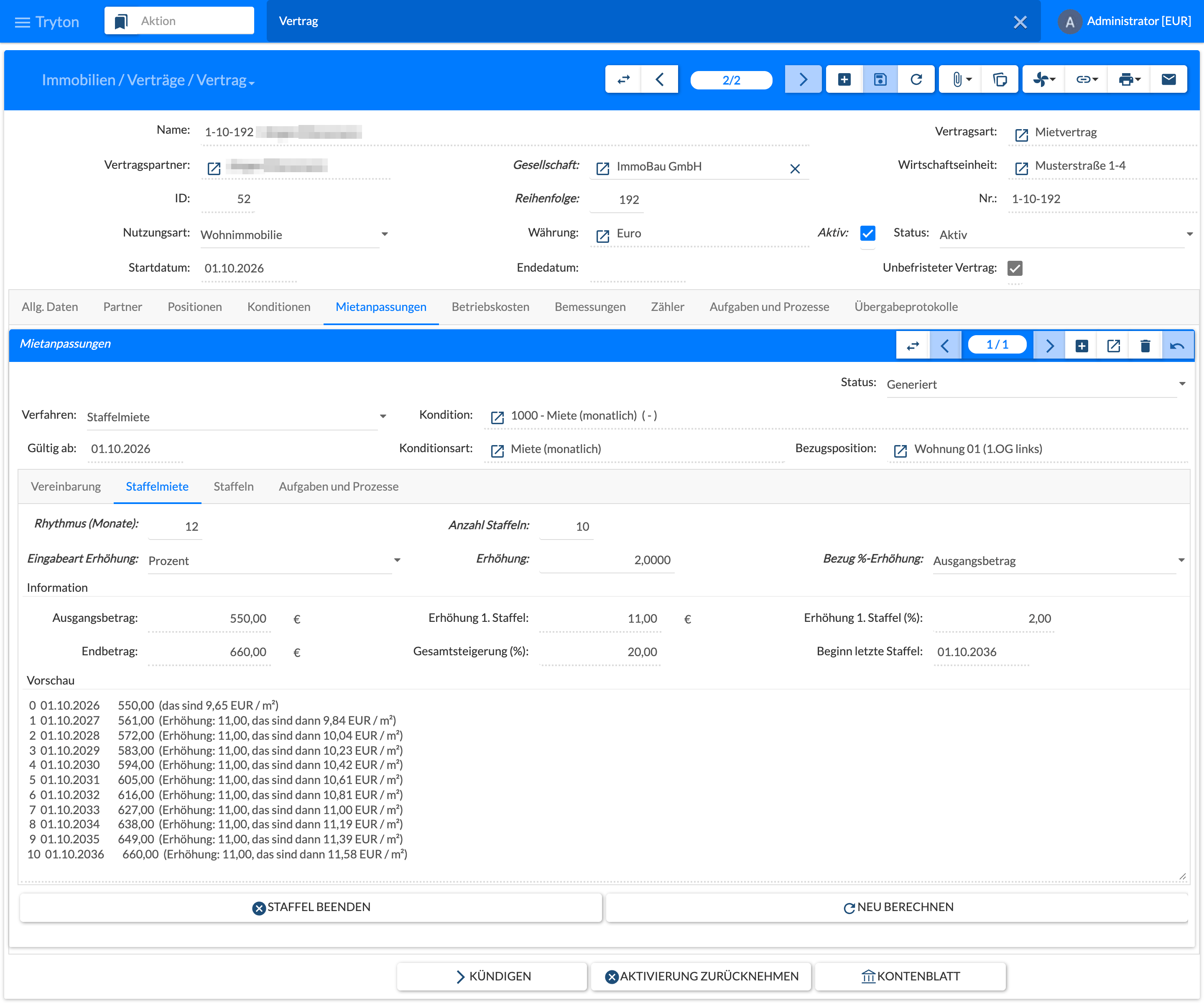
In the example the initial rent of € 550.00 rises every 12 months by 2 % of the initial amount, i.e. by € 11.00 per step. After 10 steps it is € 660.00 from 01.10.2036 (total increase 20 %). The area Information summarises this: Ausgangsbetrag (initial amount), Erhöhung 1. Staffel (increase of the 1st step) in € and %, Endbetrag (final amount), Gesamtsteigerung (%) (total increase) and Beginn letzte Staffel (start of last step). The Vorschau (preview) lists every step with start, amount, increase and €/m² (via the informative measurement type living area).
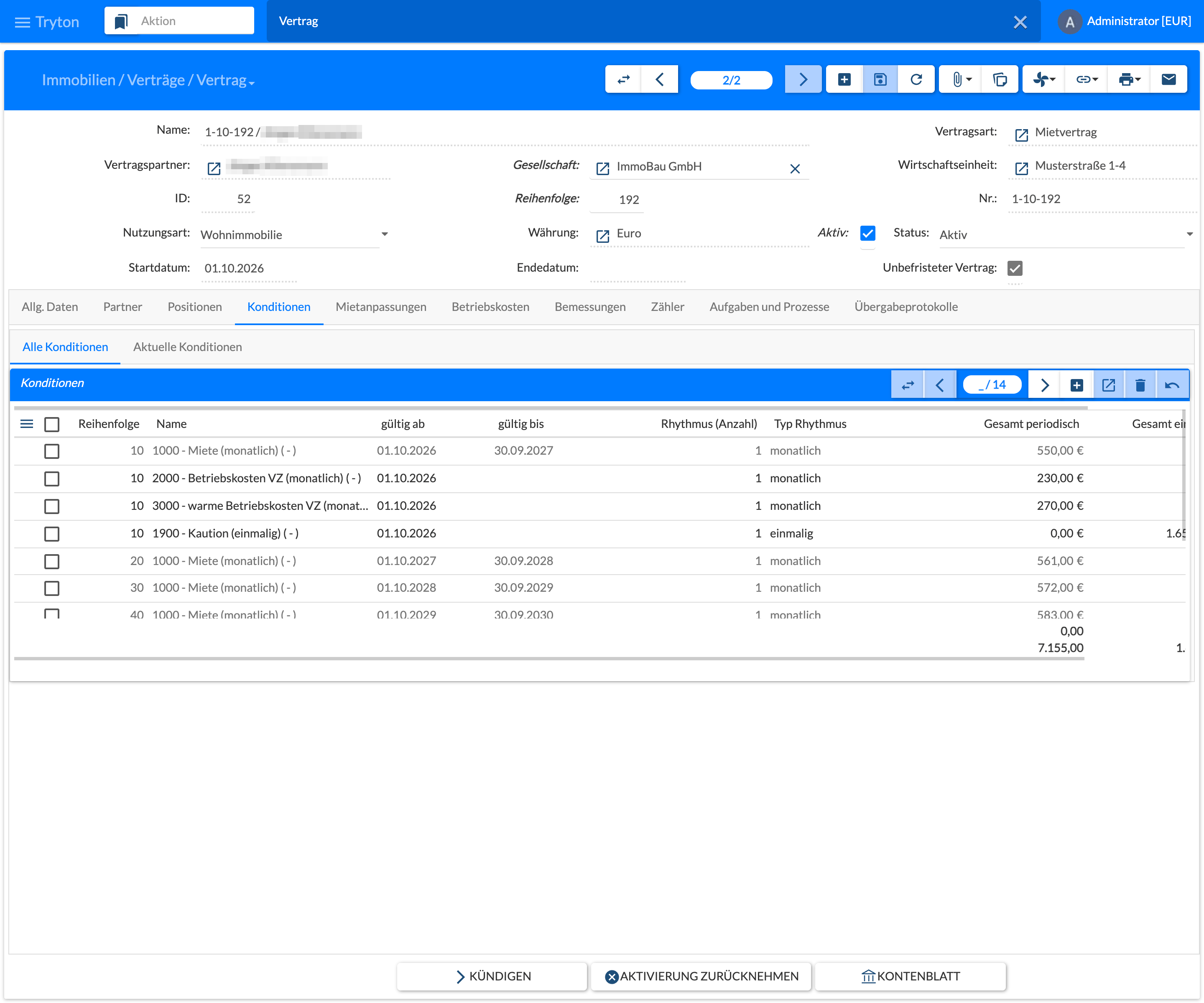
After generating, the steps are listed in the tab Konditionen › Alle Konditionen (Terms › All Terms) of the contract: the reference term (sequence 10, € 550.00) ends on 30.09.2027, the steps follow with sequence 20, 30, 40 … and a term of one year each (€ 561.00, € 572.00, € 583.00 …); the last step stays open. Locked steps are shown in grey. The tab Aktuelle Konditionen (Current Terms) shows only the terms valid today.
As long as no step has been posted, Neu berechnen (Recalculate) and Zurücksetzen (Reset) can be used freely.
Further checks when generating:
- The last step must lie before the end of the contract or term (G07); the message states the maximum possible number.
- The contract must be draft or running and must not have a recorded termination (G09).
- Warning if the step start does not match the rhythm of the debit posting (G13).
- Warning about rounding differences if the quantity ≠ 1 (G12).
Applying the Individual Steps
- No separate step: There is no increase letter, no adjustment run and no consent of the tenant. The periodic posting invoices the amount of a step automatically from its start, see 6.3 Periodic Posting.
- Locked steps: The reference term and all intermediate steps are locked. Start, end, term type, rhythm and taxes cannot be changed, the steps cannot be split, and no other adjustment procedure is possible. Quantity and unit price can be corrected.
- Changes after the first posting: Every change (recalculate, end graduated rent, amount correction) requires a confirmed warning, because a supplement with the tenant is needed. It only affects steps not yet posted and is logged.
- Staffel beenden (End graduated rent): deletes the unposted steps. The last posted step then stays open.
- After the last step: The last step can be adjusted normally again, e.g. by comparative rent in an adjustment run, modernisation or a follow-up graduated rent (new graduated rent with the last step as reference term).
- Follow-ups: The task rules Staffelmiete endet (graduated rent ends, 3 months before the start of the last step) and Kündigungsverzicht endet (waiver of termination ends, 3 months before) exist but are inactive by default. Activate them in 2.5.7 Tasks and Processes if needed.
Legal Framework (§ 557a BGB)
| Rule | Implementation in the module |
|---|---|
| Written agreement (para. 1) | Field Schriftform: error for residential space (G10), note for commercial space. |
| Every rent or increase stated as an amount of money (para. 1) | Every step has exactly one € amount, rounded to the cent. Input per m² or in % is only a calculation aid; the printed € table is decisive. |
| Rent unchanged for at least 1 year (para. 2 sentence 1) | Rhythm ≥ 12 months (G02). |
| No increase under §§ 558–559b during the graduated rent (para. 2 sentence 2) | Steps are locked. Comparative rent (V01), modernisation (E02) and index rent (I14) skip locked steps. Graduated and index rent on the same term exclude each other. Operating costs (§ 560) remain possible. |
| Waiver of termination at most 4 years from the agreement (para. 3) | Warning G11; only the waiver would be invalid. |
| Step takes effect without a declaration | No letter, posting directly from the terms. |
| Rent cap per step at the time it falls due (para. 4) | Not yet implemented. Only the initial rent is checked by the wizard for new lettings; the comparative rent of future dates is not known when the contract is concluded. |